Cloud Threat Hunting: A Practitioner's Guide for Hybrid Environments
Mike Dupuis
Marketing, Crogl

Cloud threat hunting demands visibility into identity chains and the logging gaps around them.
Key Takeaways
- Cloud threat hunting is a discipline focused on identity, API telemetry, and control plane activity, with its own data sources and hypotheses.
- Identity is the usual pivot point in cloud compromises, so hunt hypotheses must target service principal abuse, cross-account role assumption, and credential theft from instance metadata.
- Cloud providers have logging defaults that leave critical visibility gaps. A hunter must map log coverage and retention before starting a hunt to avoid false confidence from null results.
- A hunt that starts in the cloud often pivots to on-prem data, creating a query-translation tax as hunters switch between SIEM, EDR, and cloud platform languages.
- Documenting null results is as important as documenting findings. An auditable record must show what was searched, what logs were queried, and what gaps existed.
Cloud threat hunting is the practice of proactively searching for adversary activity across cloud control planes, identity systems, and workloads using hypothesis-driven analysis. A threat hunter receives intelligence about a campaign targeting service principal credentials in Azure. On-prem, the playbook is familiar: pivot from endpoint telemetry to authentication logs in the SIEM. The cloud does not work that way. The relevant evidence for this hunt lives in Azure Activity Logs and Entra ID sign-in logs, each with its own query language and retention defaults. The attack surface here is an identity chain.
This is the central challenge for security operations teams. Cloud threat hunting requires a new operating model. It demands different hypotheses, different data sources, and a clear map of what the environment does and does not record. This guide covers how to scope, execute, and document cloud hunts across fragmented hybrid infrastructure, from building identity-focused hypotheses to interpreting the findings for auditors.
What Cloud Threat Hunting Is and How It Differs from On-Prem Hunting
The differences start with where a hunt begins. On-prem hunting often starts from network telemetry, endpoint process trees, and authentication logs on infrastructure the organization owns. Cloud hunting starts from API call logs, identity federation chains, and control plane events on infrastructure the organization rents. That shift changes how a hunt team works in a few concrete ways.
First, the attack surface shifts from network segments to identity trust boundaries. An on-prem hunt might track lateral movement through SMB or RDP. The cloud equivalent is tracking an AssumeRole chain in AWS or service principal impersonation in Azure. The adversary moves between roles and permissions.
Second, the primary data sources change. Sources like AWS CloudTrail, Azure Activity Log, and Google Cloud Audit Logs replace NetFlow, packet captures, and local Windows event logs as the starting point for most hunts. These logs document API calls and configuration changes, which are the currency of cloud operations and compromise.
Third, telemetry ownership is conditional. The cloud provider controls what gets logged by default, and those defaults are usually tuned to keep logging costs down. The hunter must verify log retention, coverage, and completeness before scoping a hunt. The hunter looking for service principal abuse cannot start the same way they would hunt for Kerberos abuse on a domain controller. The entire threat model is different, and the MITRE ATT&CK Cloud Matrix exists to map these new adversary behaviors. Applying on-prem hunting muscle memory to cloud environments produces blind spots.
The Identity Layer Is the Primary Cloud Attack Surface
Identity is the pivot point in many significant cloud compromises. Google's Cloud Threat Horizons H1 2026 report found that compromised identities were involved in 83% of cloud and SaaS intrusions in H2 2025. That statistic matters for cloud threat hunting because identity is often the mechanism attackers use after initial access to expand reach, assume roles, and persist across services. Cloud hunters must therefore focus on how attackers obtain and abuse credentials, roles, and permissions.
Azure threat hunting: service principal abuse
Service principal abuse in Azure shows how this works in practice. The hypothesis might be that an attacker created or hijacked a service principal to maintain persistence, a technique mapped to MITRE ATT&CK T1078.004, Valid Accounts: Cloud Accounts. The hunt starts by querying Entra ID audit logs for new service principal registrations or credential additions to existing ones. The hunter then correlates the object ID of any suspicious principal with resource-level actions in the Azure Activity Log. The goal is to distinguish malicious activity from the baseline noise of legitimate administrative tools like Terraform or Azure DevOps, which generate similar log patterns.
AWS threat hunting: credential theft from IMDS
Another common pattern is credential theft from the EC2 Instance Metadata Service, or IMDS. This hunt, targeting T1552.005, Unsecured Credentials: Cloud Instance Metadata API, starts on the host, because IMDS requests never reach CloudTrail. The hunter looks in EDR or host telemetry for IMDS calls from unexpected processes on a workload, and notes which instances still allow IMDSv1. The hunter then checks CloudTrail for API calls made with the resulting temporary credentials from an IP address outside the workload's expected VPC or corporate IP range.
Read more: Threat Hunting Tools: A 2026 Buyer's Guide
Mapping Cloud Logging Gaps Before You Start Hunting
The most dangerous failure mode in cloud threat hunting is scoping a hunt against logs that do not exist. Cloud providers ship with logging defaults that create critical visibility gaps, and a hunter who does not map those gaps before writing a hypothesis will produce only false confidence from null results. This is the cloud-specific version of the cold data problem, where data is missing because the provider never recorded it in the first place.
For example, a hunt for unauthorized data exfiltration via S3 GetObject calls will return nothing if the target AWS accounts have not explicitly enabled CloudTrail data events for S3. The default setting only captures management events, so an empty result there tells the hunter only that the logs were never written. Mapping log gaps formally is a prerequisite for any cloud hunt.
Default Logging Gaps Across AWS, Azure, and GCP
The specific defaults differ by provider. A hunter must verify these configurations before assuming log data is available.
- AWS: CloudTrail management events are enabled by default in all accounts, but data events, which record object-level API activity for services like S3 and Lambda, are not. A hunt for Lambda invocation abuse, for example, will fail without data event logging enabled.
- Azure: The Azure Activity Log captures control plane operations, but visibility into data plane operations requires enabling diagnostic settings on a per-resource basis. A hunt for credential theft from Azure Key Vault or unauthorized access to a Storage Account will find nothing if these settings are not configured.
- GCP: Admin Activity audit logs are always on, but Data Access audit logs are off by default for most services. BigQuery is the main exception, where Data Access logs are enabled by default. Similar to AWS and Azure, hunts targeting data-level interactions in other GCP services will be blind unless an administrator has explicitly enabled this more verbose logging.
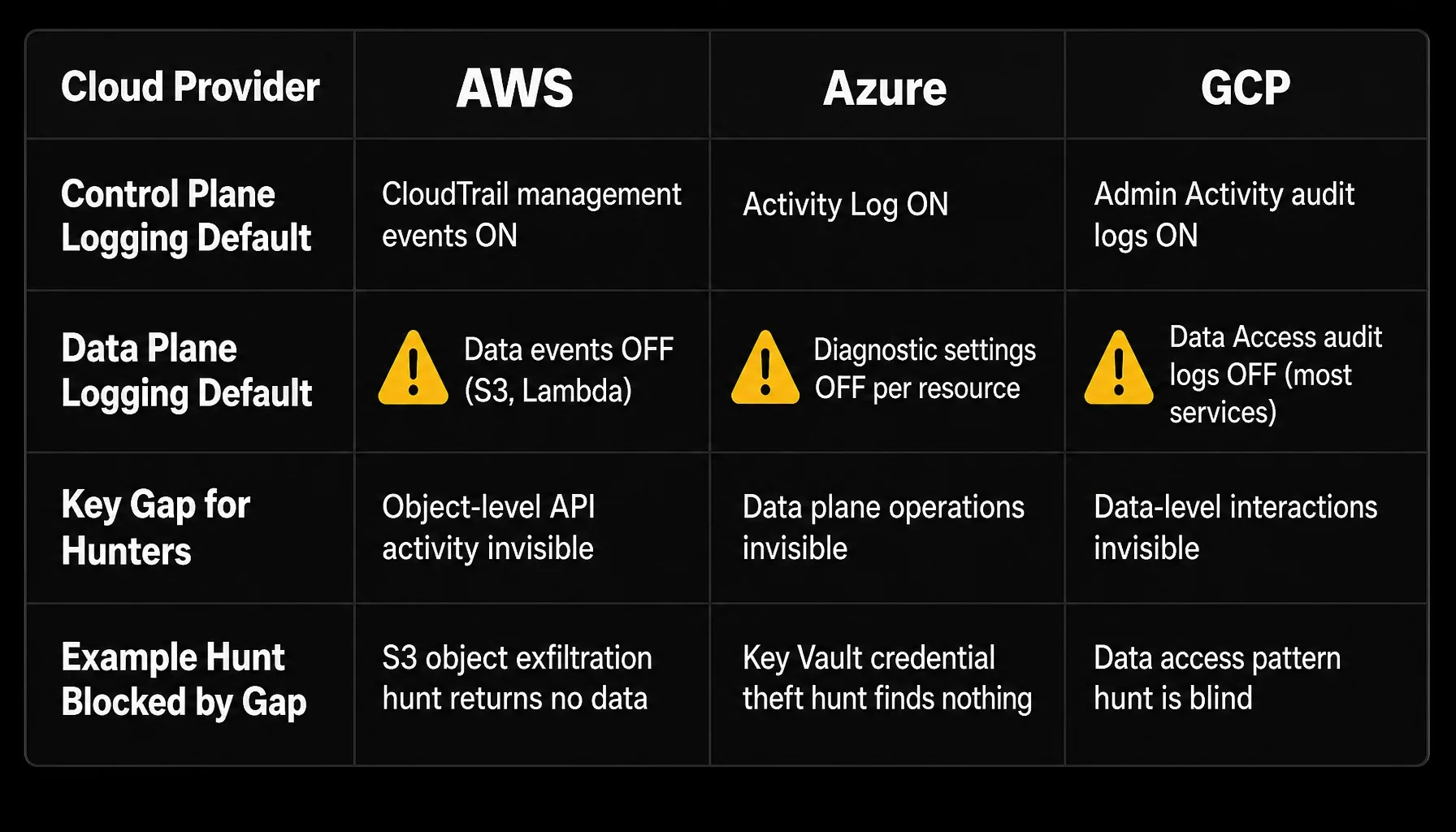
All three major cloud providers leave data plane logging off by default, creating hunt blind spots.
Building a Hunt-Ready Log Coverage Map
Building a log coverage map is a practical, repeatable process. Before each hunt, the hunter should list every cloud service and account in scope. For each, the map must document whether control plane and data plane logging are enabled, what the retention period is for each log source, and where the logs are stored. This map becomes part of the formal hunt scoping document.
Gaps surface quickly once the map exists. A team scoping a 90-day retrospective hunt for unauthorized cross-account access might discover that CloudTrail logs in a secondary AWS account are retained for only 30 days in the SIEM. An S3 lifecycle rule can cause the same gap by expiring retained logs after 30 days. The hunt window for that account would immediately shrink, and the scoping document would need to reflect this constraint. The log coverage map records that constraint alongside every other gap. It documents what the hunt can and cannot see, which is critical for interpreting null results later.
Building a Cloud Threat Hunt Hypothesis
A cloud hunt hypothesis must be specific. Vague goals like "look for suspicious activity in AWS" lead to unfocused queries and wasted analyst time. A strong hypothesis names the specific cloud service, the identity type, the log source, and the expected adversary behavior. The process often starts with external threat intelligence.
Suppose an advisory describes a campaign using compromised OAuth application credentials to access Microsoft 365 mailboxes. A hunter can translate this into a testable hypothesis: an attacker registered a malicious OAuth application in our Entra ID tenant and granted it Mail.Read permissions to exfiltrate email. For a broader breakdown of how intelligence becomes a hunt, see this guide to threat hunting vs. threat intelligence.
This hypothesis immediately defines the data sources and query plan, summarized in the diagram and the list below.
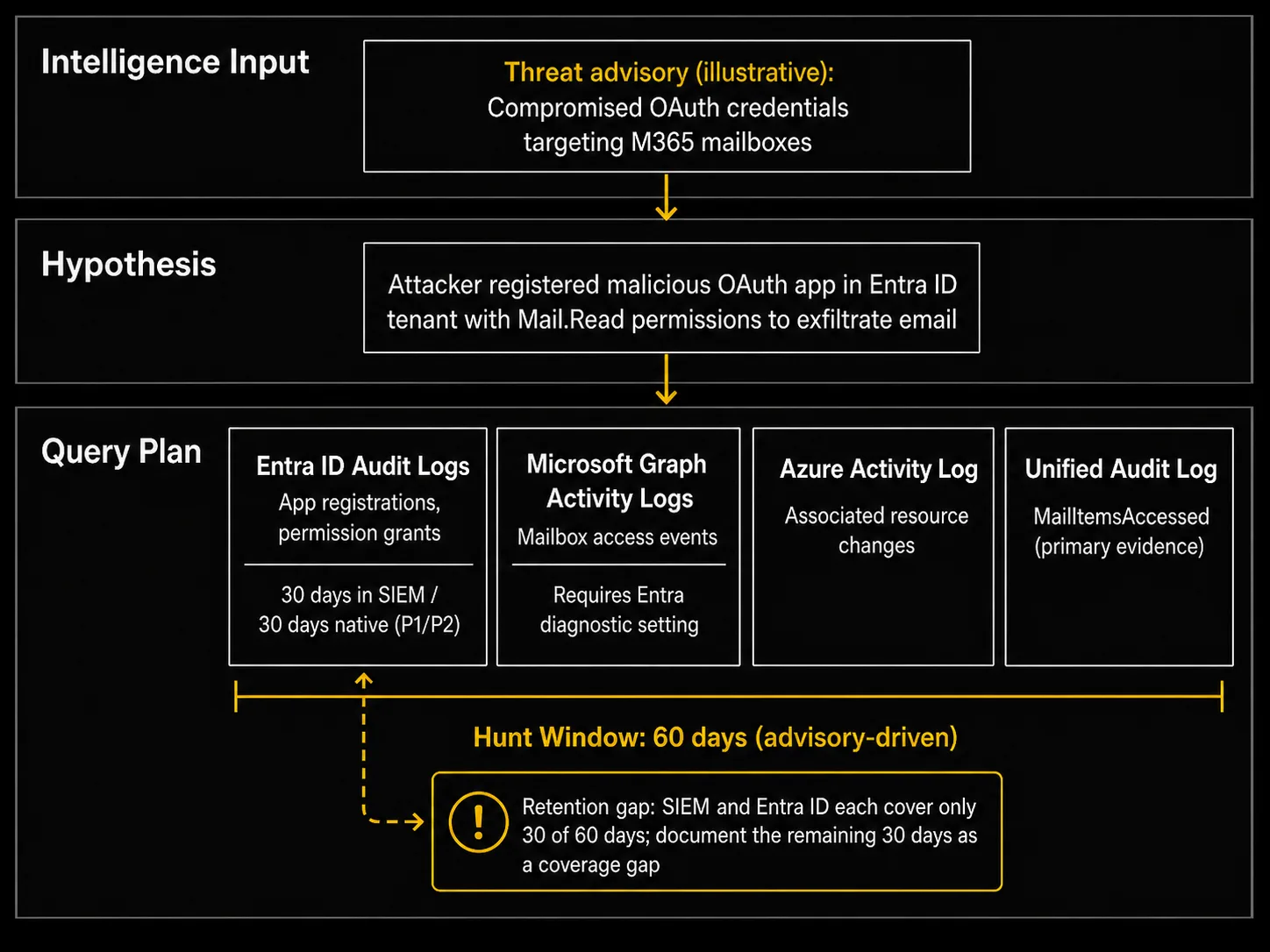
A strong cloud threat hunting hypothesis names the service, identity type, log source, and expected adversary behavior.
- Data Sources: Entra ID audit logs for application registrations, Microsoft Graph activity logs for mailbox access, MailItemsAccessed events in the Unified Audit Log as the primary evidence of mailbox access, and Azure Activity Log for any associated resource changes. Microsoft Graph activity logs are not available by default, and the hunt depends on an Entra diagnostic setting being configured to route them to a destination the team can query.
- Scoping Constraints: The hunt window is 60 days based on the advisory, but the log coverage map shows Entra ID audit logs are retained for only 30 days in the SIEM. Entra ID itself keeps them for 30 days on P1/P2 licenses and 7 days on the free tier. The query plan must record the remaining 30 days as a documented coverage gap.
The intelligence can also inform profiling of adversary infrastructure using a framework like the Diamond Model of Intrusion Analysis, which helps organize relationships between the adversary, their tools, and their targets. A well-formed hypothesis drives a focused hunt and keeps analysts from querying every cloud log source without a defined question.
A focused hypothesis also makes the hunt easier to document. As the hunt runs, the record should capture the evidence, the decision, and the owner for each finding, which sets up the audit trail covered later in this guide.
Hunting Across Hybrid Cloud and On-Prem Infrastructure
Enterprise cloud environments are usually hybrid, so a hunt that starts in the cloud can pivot to on-prem data, and vice versa. The operational challenge is that the evidence lives in different systems with different query languages. This creates a query-translation tax that directly limits hunt coverage.
A hunt may start with a suspicious OAuth token grant in Entra ID sign-in logs, pivot to mailbox delegation changes in the Unified Audit Log, and then stall. The adversary's next move could be an RDP session from a VPN endpoint at 203.0.113.45 into an on-prem domain controller. The hunter now needs to correlate an Entra ID object ID with an on-prem SID. Then comes an EDR query for process creation, and a SIEM search across Windows authentication logs stamped in a different timestamp format. That pivot spans three tools, three query languages, and three time-zone normalization problems while the hunt clock keeps running. If the hunter also suspects WMI persistence on that host and Sysmon is not deployed, the Windows WMI-Activity operational log, Event ID 5861, offers a native record of new permanent event subscriptions. If the EDR showed no unexpected processes, the logins matched an approved change ticket, and no new WMI subscriptions appeared, the analyst would close the lead as a documented null result. If any of those checks came back positive, the analyst would escalate the session to incident response with the correlated evidence attached.
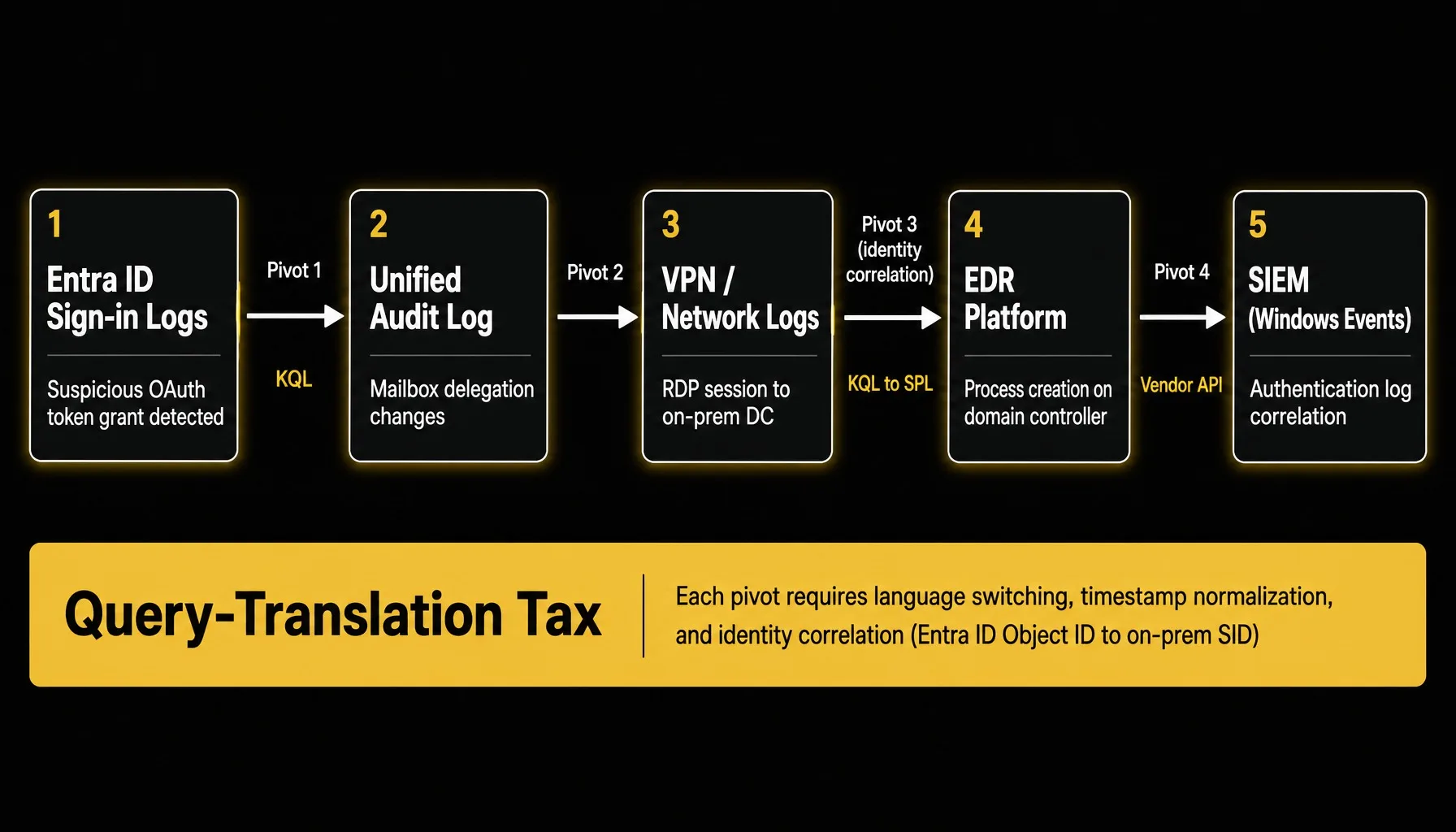
Hybrid cloud threat hunting pivots across systems, languages, and identity formats at every step.
Every pivot like that costs coverage. When each pivot means translating queries between KQL, SPL, and a vendor's API, in an illustrative case, a manual hunt can take 40 minutes or more per finding even with immediate data access. Where a hunter must request access or restore archived logs, the hunt stalls, and the team runs fewer hypotheses per cycle. Approaches like federated search reduce this tax by querying each source in its native format. For a deeper look at the collection bottleneck behind that estimate, see this breakdown of threat hunting framework data collection.
Documenting Cloud Hunt Findings and Interpreting Null Results
A cloud threat hunt produces two types of findings, and both require rigorous documentation for compliance and audit. The first is evidence of adversary activity. The second is a null result: evidence that a specific hypothesis did not hold in the visible data. This second type still has value. A documented null result narrows the threat surface and provides auditable proof that the organization tested for a specific threat during a specific window.
A null result only has value if the documentation is complete. The record must show the hypothesis, the data sources queried, the exact query logic, the time window, the log coverage map, and the analyst's interpretation. Without that record, a null result is indistinguishable from a hunt that was never run.
This complete record should be logged in the organization's case management or ticketing system. For regulated industries and government agencies, this evidence locker is critical. It demonstrates proactive diligence to an auditor, proving that the security team actively tests its defenses against known adversary behaviors. Teams preparing for compliance reviews can use this record as part of their broader audit readiness posture.
The same record should feed back into the hunt playbook. When a null result exposes a logging gap, note that gap in the playbook so the next cycle can retest the hypothesis once coverage improves. Plan each hunt cycle to refresh existing playbooks as well as add new hypotheses, so coverage of known techniques deepens over time. When you revise a playbook, keep its original ID so earlier hunt records still point to it, and add a visible updated date. Before a revised playbook goes back into rotation, require technical sign-off from a senior hunter on its query logic and scoping.
Effective cloud hunting starts with mapping log gaps before writing a hypothesis, then scoping hunts around identity and API telemetry and documenting every result, including null findings, in a defensible record. Teams that build a consistent hunt cadence around these practices give themselves a better chance of finding threats that alert-driven workflows miss.
Hunting Across Cloud and On-Prem Data Without Building New Pipelines
Cloud threat hunting puts two demands on a team. Hunters must query evidence across multiple cloud platforms, SIEMs, and on-prem systems, each with different schemas and query languages. The query-translation tax described earlier applies at every one of those pivots. At the same time, every step requires an inspectable record for audit.
Crogl is built around those two requirements. Its federated search sends each query to where the data already lives and runs it in that source's native format, with no normalization step. A hunter can review queries before they run, and Crogl executes them across the hybrid environment, showing the full evidence chain. That matters for advisory-driven hunts like the OAuth example above. At a major US electric utility, Crogl cut analyst time per alert by 75%, and the team now works each CRISP advisory in under an hour, down from more than 24.
For environments where data cannot leave the enclave, Crogl runs on-prem, in private cloud, or fully air-gapped. Every query, result, and analyst decision lands in your case system, which produces the documented hunt record described above, null results included. Crogl runs the queries and assembles the evidence. The analyst decides what the findings mean and what happens next.
Download Crogl to run a cross-environment cloud threat hunt against your own data without building new pipelines first.
Frequently asked questions
What is the difference between cloud detection engineering and cloud threat hunting?
Detection engineering builds automated rules that fire when known patterns appear in cloud telemetry. Threat hunting starts from a hypothesis about adversary behavior that existing detections have not covered and searches for evidence. Detection engineering produces alerts. Threat hunting produces findings that may lead to new detections.
How should a SOC prioritize cloud hunt hypotheses when analyst capacity is limited?
Prioritize hypotheses based on threat intelligence relevance, the availability of required log sources, and the time since the last hunt against that category. Hypotheses targeting high-exposure identity patterns with confirmed log coverage should run first. Rank remaining hypotheses by how recently the technique appeared in active campaign reporting and whether the log coverage map confirms full visibility for the required data sources.
What MITRE ATT&CK techniques are most relevant to cloud threat hunting?
The MITRE ATT&CK Cloud Matrix highlights techniques specific to cloud environments. T1078.004 (Valid Accounts: Cloud Accounts), T1552.005 (Unsecured Credentials: Cloud Instance Metadata API), T1537 (Transfer Data to Cloud Account), and T1580 (Cloud Infrastructure Discovery) are common starting points. Hunters should map these techniques to the specific cloud services in their environment.
What does a cloud threat hunt look like in an air-gapped or classified environment?
Air-gapped cloud hunting targets private cloud partitions where data cannot leave the enclave. The process is the same: hypothesis, log coverage map, query execution, and documentation. The key constraint is that all tooling, enrichment data, and threat intelligence must reside inside the boundary, preventing calls to external APIs.
How do you correlate threat intelligence with cloud control plane telemetry?
Start with indicators from the intelligence source, such as IP addresses, user agents, or API call patterns. Query cloud control plane logs like CloudTrail or the Azure Activity Log for matches. The correlation is most useful when the intelligence names specific cloud techniques, because generic IOCs like IP addresses rotate quickly in cloud campaigns.
How do you interpret a null result from a cloud threat hunt?
A null result means the hypothesis did not hold in the visible data during the hunt window. It does not confirm a clean state. The interpretation depends on the log coverage map. If logs were present and retention covered the full window, the null result has higher confidence. If gaps existed, the scoping document must record them.